
This 250+ engineer team replaced shared staging with isolated database branches for safer deploys
/Changelog

Changelog

The latest product updates from Neon

RSS feed

Snapshots now in Beta with automated scheduling

The Backup & Restore page in the Neon Console is now available to all users. It combines instant point-in-time restore with snapshots to help you protect your data and recover from accidental changes, data loss, or schema issues. The snapshots feature is now in Beta with new capabilities for automated snapshot management. Use the Enhanced view toggle to access the new Backup & Restore page with snapshot capabilities, or toggle it off to return to the previous Restore page.
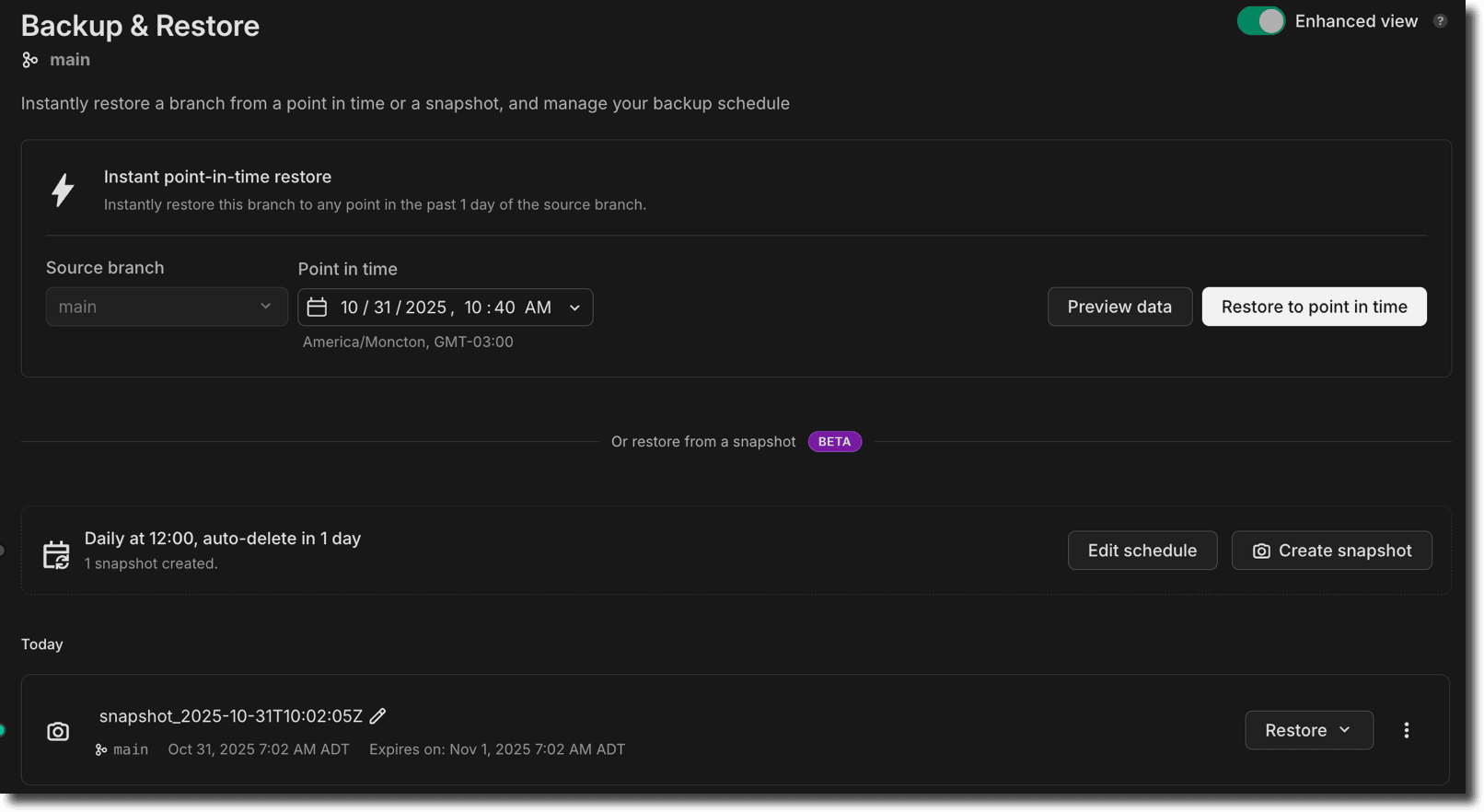
Backup and restore page

Snapshots (Beta):

  • Scheduled snapshots — Automate snapshots with daily, weekly, or monthly schedules (available on paid plans, excluding the Agent plan) Snapshot schedule configuration showing daily, weekly, and monthly options
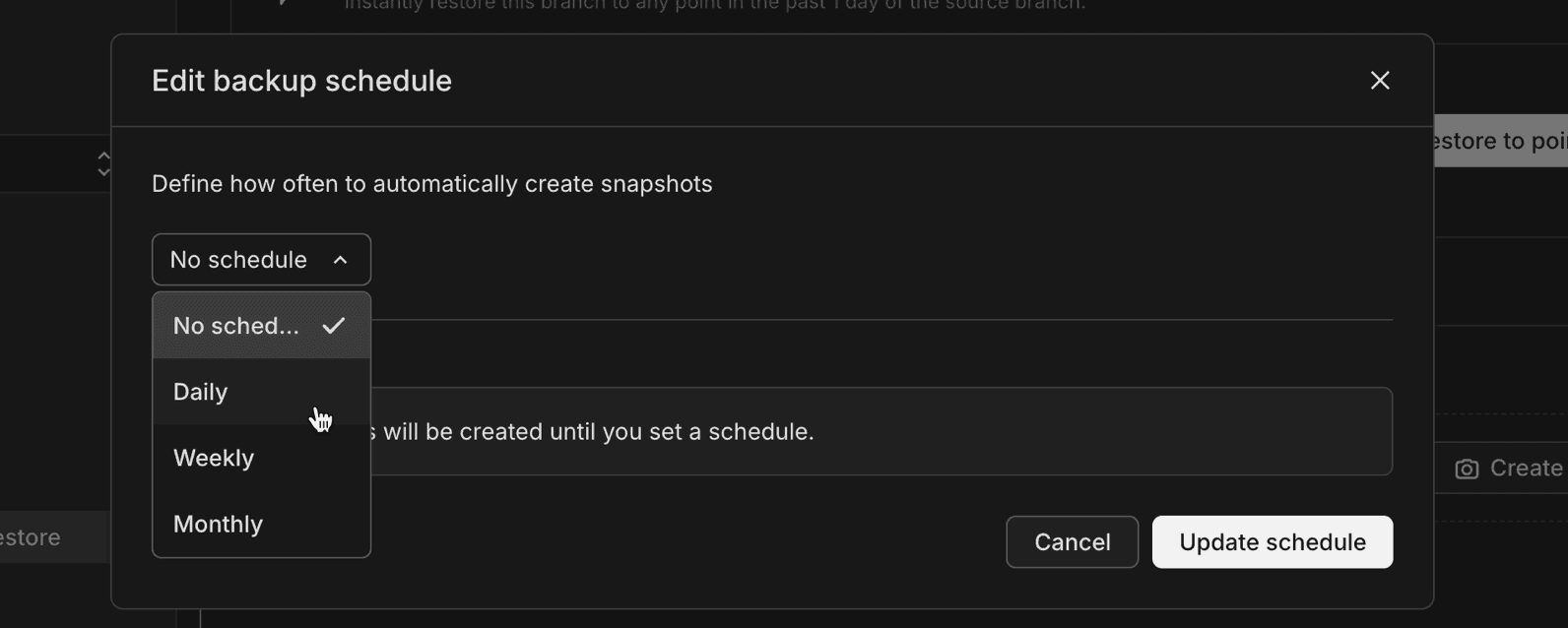
  • Flexible retention — Configure how long to keep automated snapshots before they're automatically deleted

Instant restore improvements:

  • Preview data before restoring — The instant point-in-time restore feature now includes a Preview data button that lets you browse tables, run queries, and compare schemas at the selected restore point before committing to the restore operation
  • Improved timezone display — The date/time picker for instant restore now shows times in your project's region timezone, and snapshot names include the region timezone for clarity

Together, these features help you maintain reliable recovery points for your production databases without manual intervention.

Postgres extension updates

We've expanded extension support for Postgres 18.

Now available on Postgres 18:

ExtensionVersion
hll2.19
pgcrypto1.4
pgjwt0.2.0
pg_hashids1.2.1
rdkit4.8.0
pg_roaringbitmap0.5

For a complete list of Postgres extensions supported by Neon, see Postgres extensions.

100x smaller Docs pages served to LLMs

We've updated the serving logic in our documentation, guides, and PostgreSQL Tutorial sites to serve raw markdown in response to web requests from user-agents we can identify as LLM Agents (like ChatGPT, Claude, Copilot, etc...)

The result is 80-100x smaller page sizes, 6x speed-up, and most importantly fewer tokens costing you money and occupying your context windows as you work with codegen agents to ship faster.
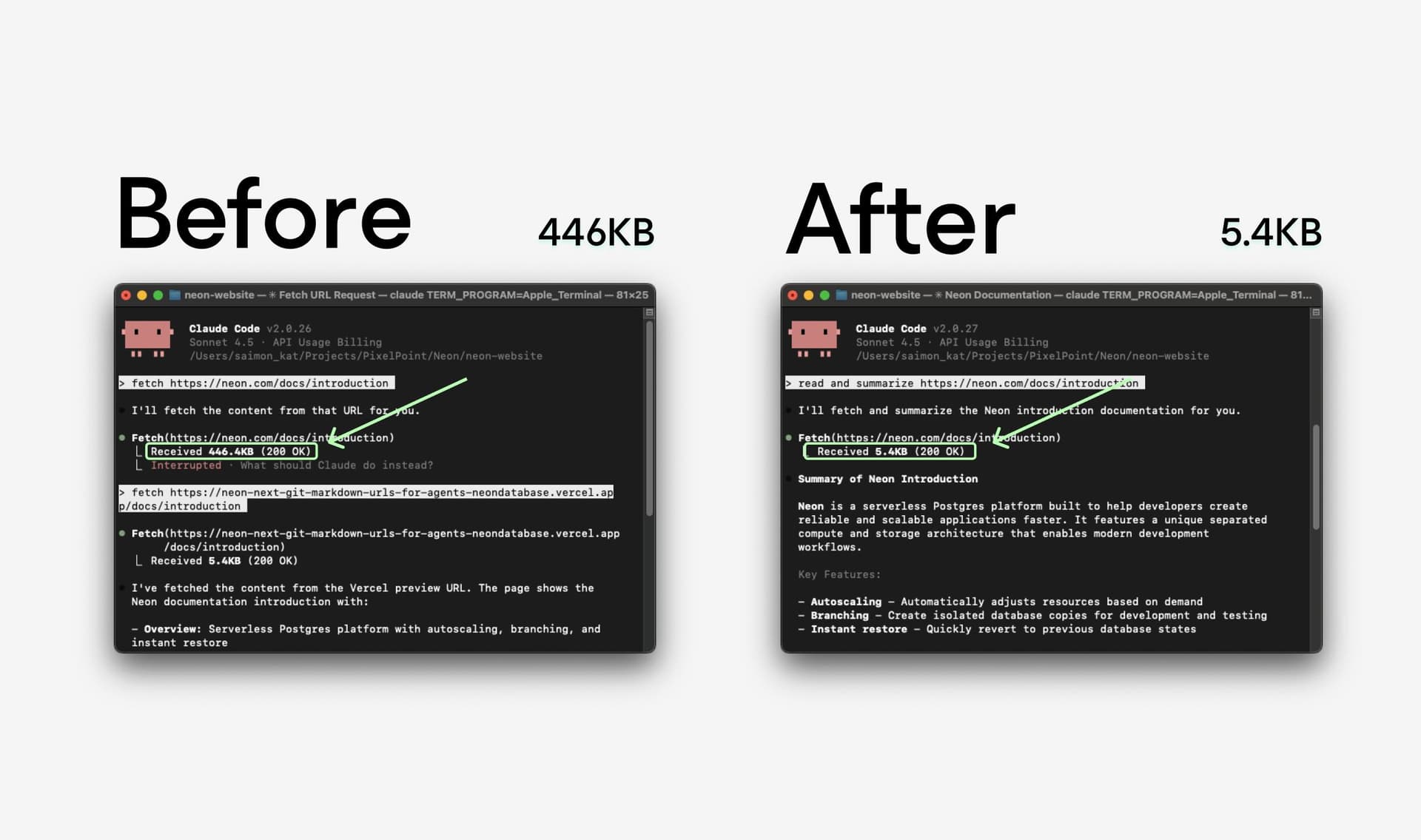
Neon Docs now serve markdown to LLMs

AI-ready prompts for faster setup

We've added pre-built AI prompts to our integration guides to help you get started with Neon faster in your AI-enabled code editor. Simply copy a prompt from any guide and paste it into your AI assistant (Cursor, GitHub Copilot, Claude Code, etc.) for step-by-step setup assistance tailored to your stack.

Copy prompt for Neon guide

Guides with AI prompts:

Each prompt provides your AI assistant with the context it needs to configure dependencies, set up environment variables, establish database connections, and create working examples.

We're actively improving these prompts based on your feedback. Share your experience through the Feedback form in the Neon Console or join the conversation on Discord.

Neon Open Source Program

We've recently launched a Neon Open Source Program to support Postgres-powered open source projects. If your open source project uses Postgres and is ready to grow, we'd love to hear from you.

Visit the Neon Open Source Program page to learn more about the benefits and apply.

Fixes & improvements
  • Project dashboard

    • The Network transfer metric in the usage widget on the Project dashboard now displays usage in GB instead of KB for improved readability on paid plans.
  • Private Networking

    • Fixed an issue in the VPC endpoint restrictions view in project settings where assigned VPC endpoints were incorrectly shown as "Connection allowed: No" even when they were actively assigned to the project.
  • Vercel integration fixes

    • Fixed an issue in the Vercel-Managed Integration where exceeding the data transfer limit returned a generic error. The error message is now clear and actionable.
    • Fixed an issue in the Vercel-Managed Integration where removed Vercel team members were not automatically synchronized with Neon organizations. Member removals and role changes are now properly synchronized by a periodic job.
  • Postgres extensions

    • Fixed an issue that prevented installing the postgis_sfcgal extension.
Claude Code plugin for Neon

We've launched a new plugin that brings Neon's capabilities directly into Claude Code. The new plugin includes:

  • Claude Skills to streamline key workflows:

    • neon-drizzle: Set up Drizzle ORM with Neon
    • neon-serverless: Configure connections with Neon's serverless Postgres driver
    • neon-toolkit: Manage databases, projects, and branches using the Neon API
    • add-neon-knowledge: Access Neon documentation snippets and usage examples
  • Neon MCP server integration that lets Claude interact with Neon in real time to query projects, manage databases and branches, and run SQL or migrations

  • Context rules (.mdc files) that can be used in other AI tools like Cursor

Install it from our marketplace:

/plugin marketplace add neondatabase-labs/ai-rules
/plugin install neon-plugin@neon

For more information, see Claude Code plugin for Neon.

MCP server: Schema diff and migration generation

Our MCP server now supports schema diff generation and zero-downtime migration creation. Ask your AI assistant:

Can you generate a schema diff for branch br-feature-auth in project my-app?

The assistant will compare the branch schema with its parent, show what changed, and offer to generate a zero-downtime migration to apply those changes to the parent branch.

This makes it easier to develop schema changes on feature branches and promote them when ready. For more information, see Neon MCP Server.

Storage quota doubled to 16TB

We've doubled our default storage quota from 8TB to 16TB. This means you can now run databases up to 16TB without contacting us to increase your limit. If you need to run larger databases, please reach out to our team.

Branch navigation improvements

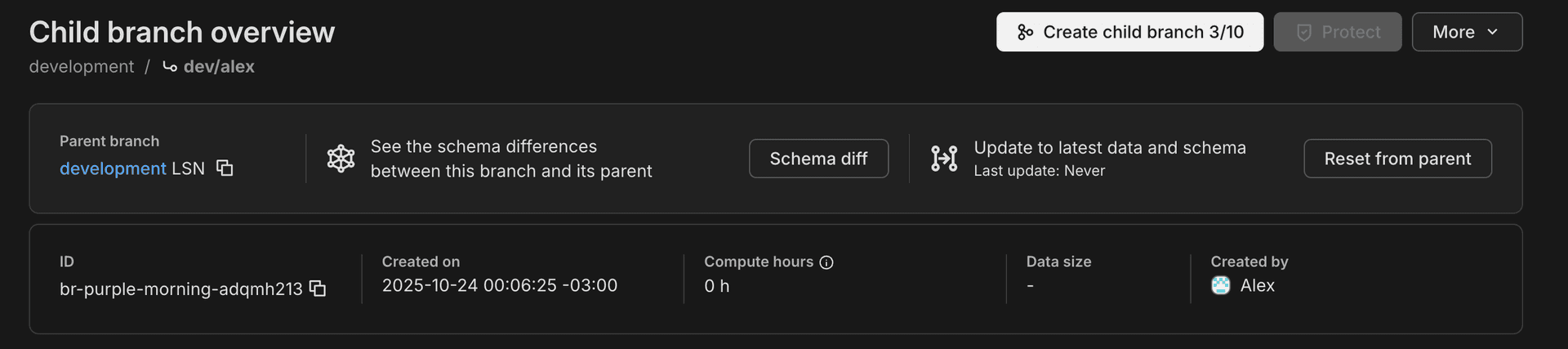
We've added breadcrumb navigation to branch pages, making it easier to understand and navigate your branch hierarchy. When viewing a child branch, you'll now see the full lineage path (e.g., production / development / feature-branch) with visual branch indicators. The page heading has also been updated to "Child branch overview" for better clarity when working with nested branches.

Branch breadcrumb navigation

Postgres extension updates

We've expanded extension support for Postgres 18 and updated several extension versions.

Now available on Postgres 18:

ExtensionVersion
anon2.4.1
address_standardizer3.6.0
address_standardizer_data_us3.6.0
h34.2.3
h3_postgis4.2.3
pg_cron1.6
pg_ivm1.12
pg_uuidv71.6
pgrag0.0.0
postgis_raster3.6.0
postgis_sfcgal3.6.0
postgis_tiger_geocoder3.6.0
postgis_topology3.6.0
postgres_fdw1.2

Version updates across all supported Postgres versions:

ExtensionOld VersionNew Version
anon2.1.02.4.1

To upgrade from a previous version of an extension, follow the instructions in Update an extension version.

For a complete list of Postgres extensions supported by Neon, see Postgres extensions.

Fixes & improvements
  • Child branch storage now capped at logical data size

    We've introduced a storage billing cap for child branches. Previously, child branch storage cost was based on all data changes over time. Now, you're billed for the minimum of accumulated changes or your actual data size, ensuring you never pay more than the logical size of your data on a child branch. This change makes child branch storage costs more predictable and helps avoid charges from long-lived branches.

  • Neon Launchpad packages renamed

    Neon Launchpad's packages were renamed: neondbget-db (CLI) and vite-plugin-postgresvite-plugin-db (Vite plugin). Use npx get-db to initiate Neon Launchpad.

    Neon Launchpad enables instant provisioning of a Postgres database without configuration or account creation. See Neon Launchpad to learn more.

Configure scale to zero in the console

Scale plan users can now adjust their scale to zero timeout directly in the Neon Console. Simply select Edit compute from the menu on the Compute tab to set a custom timeout. The Scale plan allows you to set this as low as 1 minute, a setting that was previously only available via the Neon API.

Scale to zero helps minimize costs by automatically placing inactive databases in an idle state. The timeout setting controls how fast that happens. To learn more, refer to our Scale to zero guide.

Configure scale to zero time in the Console

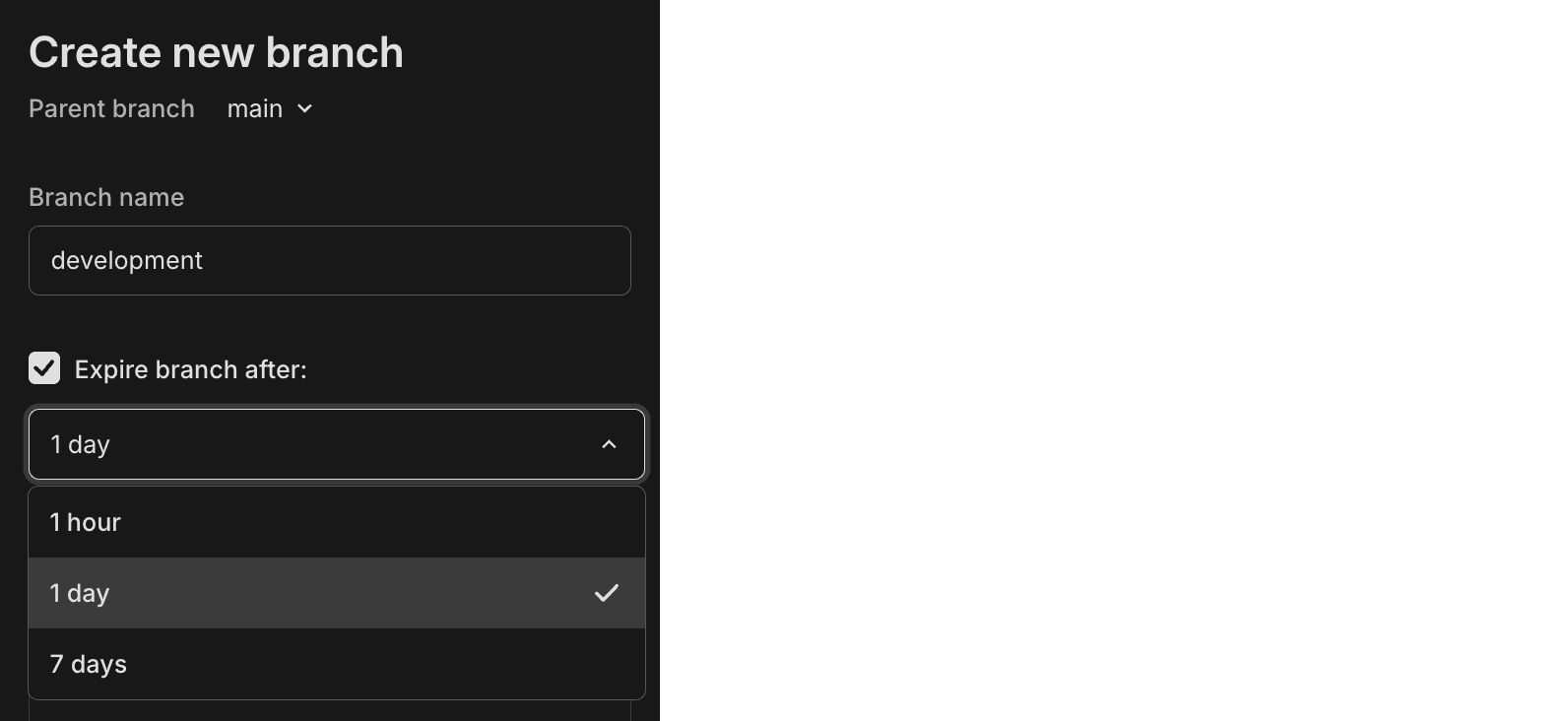
Quick presets for branch expiration

Managing your project's branches is now easier with convenient preset options. When creating or configuring a branch, choose to automatically expire it after 1 hour, 1 day, or a week. No need to manually calculate and select a specific date and time.

Setting branch expiration times can help reduce costs. To learn more, check out our Branch expiration guide.

Branch expiration preset options

New NAT gateway IP addresses

We've added new NAT gateway IP addresses in the AWS US East (N. Virginia) region to expand infrastructure capacity. If you have external IP allow lists that enable connections from external services into Neon, update those allow lists soon to include the new addresses to avoid connectivity issues.

See our Regions documentation for the complete list of NAT gateway IPs for all regions.

New VPC endpoint service for Private Networking

We've added a new VPC endpoint service address for Private Networking in the AWS US East (N. Virginia) region. If you're setting up Private Networking in the us-east-1 region, you can now use the additional endpoint service address for enhanced infrastructure capacity and reliability.

For the complete list of VPC endpoint service addresses by region, see our Private Networking guide.

E2E testing with Neon branches

Run end-to-end tests using isolated database branches. We've published guides showing how to use Neon's database branching with Playwright and Cypress to create isolated test environments for every pull request. Each PR gets its own database branch with automated schema migrations, ensuring your E2E tests run against the exact schema changes you're testing.

Fixes & improvements
  • Postgres extension updates

    • The pg_graphql extension has been updated to version 1.5.11. This extension adds a GraphQL API layer directly to your Postgres database, allowing you to query your database using GraphQL.

      To upgrade from a previous version of the extension, follow the instructions in Update an extension version.

  • Instant restore and snapshots

    • Updated default instant restore settings for new projects. Instant restore lets you recover your database to any point in time within your configured window. Previously, new projects were set to the maximum restore window for their plan; now they default to 6 hours for Free plan projects and 1 day for paid plans. You can adjust your restore window anytime in your project settings.
    • Fixed an issue where selecting a restore time using the datepicker would unexpectedly include the current time's seconds and milliseconds. Restore times now set seconds and milliseconds to zero when specified to the minute.
    • Fixed an issue where the Create snapshot button incorrectly appeared on the Backup & Restore page when a non-root branch was selected. Snapshots can only be created from root branches (branches without a parent).
  • Neon Launchpad

    • Fixed an issue where usage limits for Neon projects created using Neon Launchpad (neon.new) were not reset after being claimed to a Neon account.
  • Data API

    • Data API and IP Allow cannot be used together. To enable Data API, you must first disable IP Allow on your project.
Was this page helpful?

Subscribe to our changelog.
No spam, guaranteed.